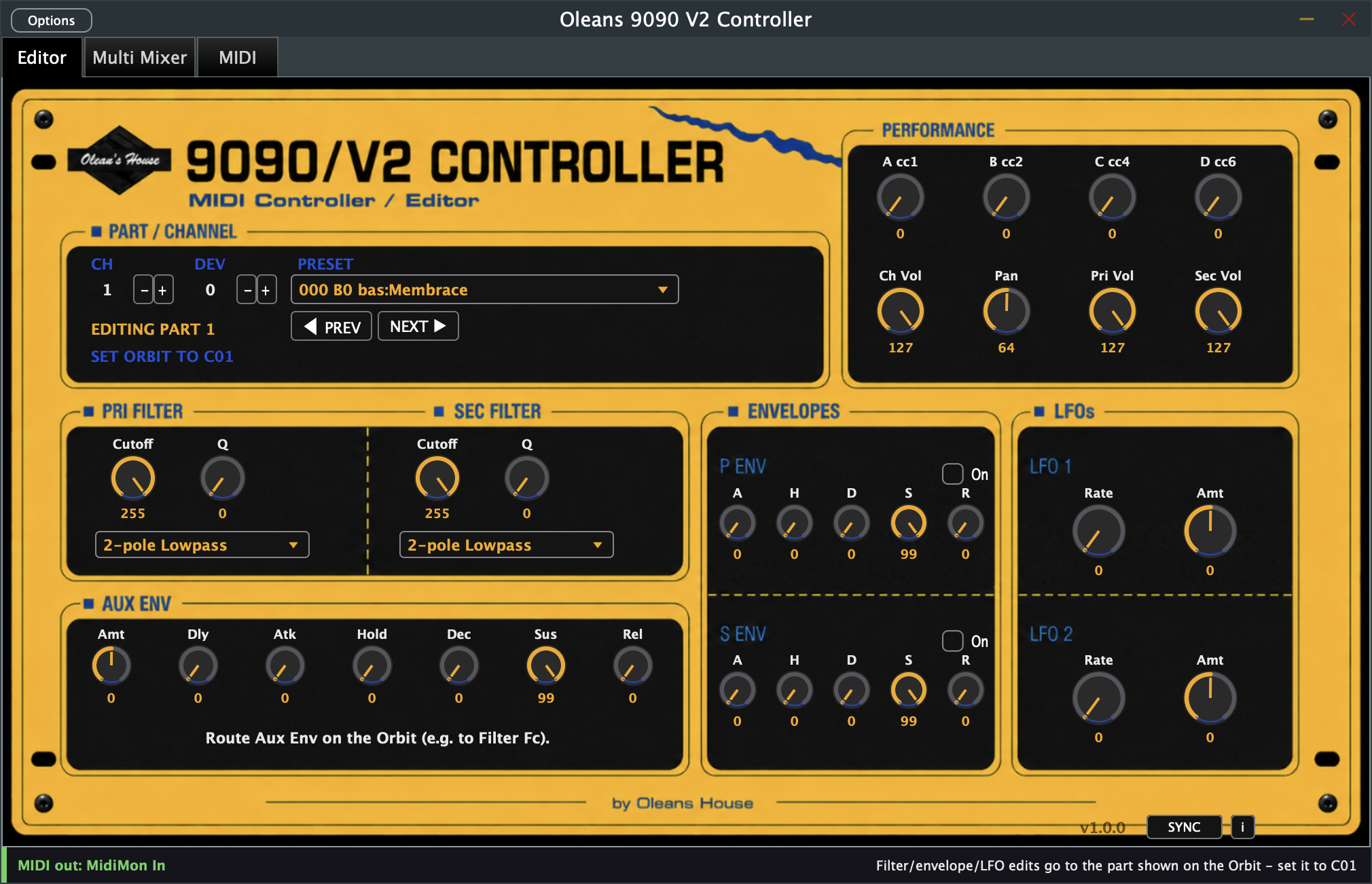
I finally released my very own E-MU Orbit 9090 Editor & Librarian, available as a VST3, AU, or standalone app for macOS, plus a Max for Live device for macOS and Windows. You can select and edit up to 16 presets in parallel and finally have quick access to pretty much all the important features and parameters instantly.
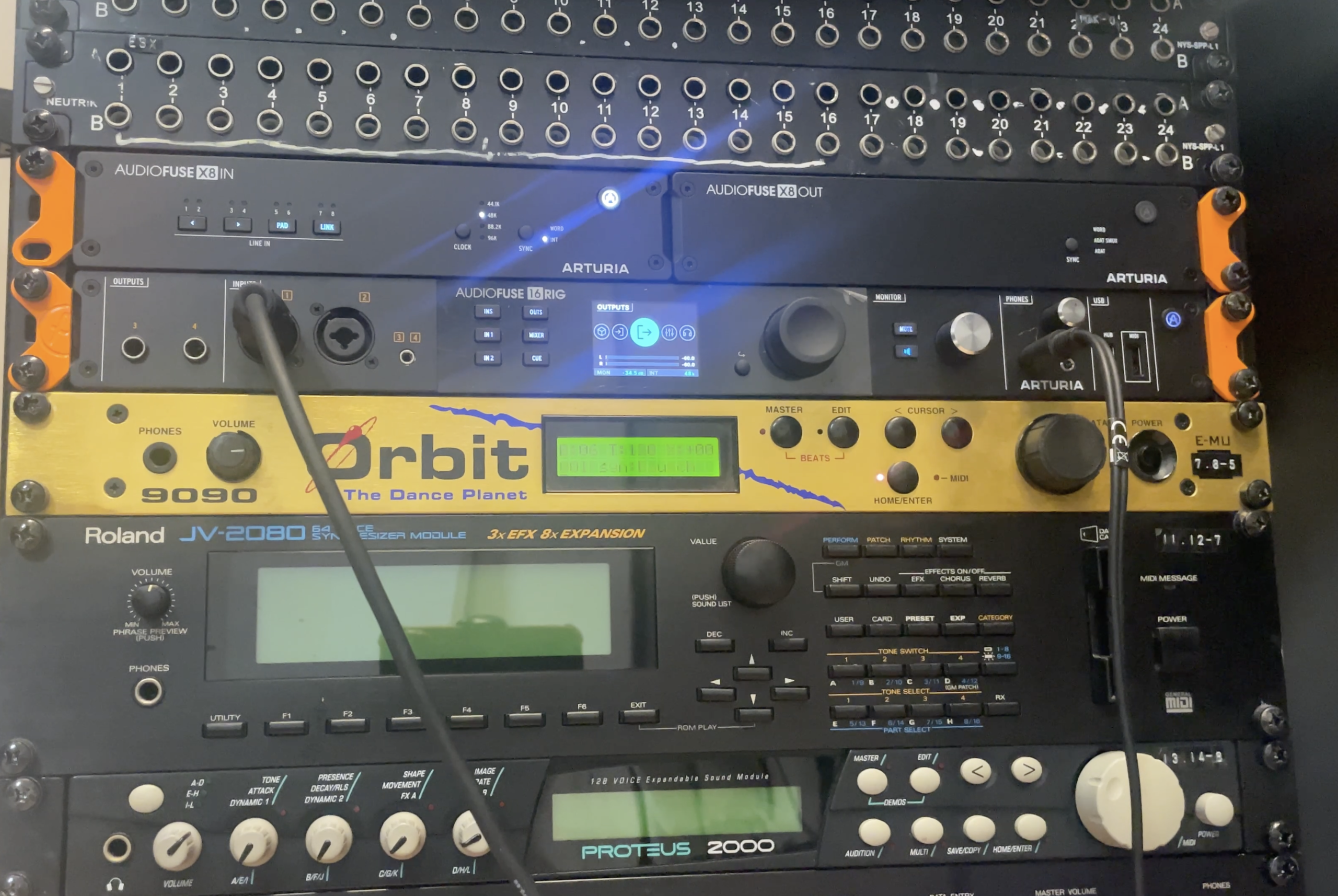
I’ve had the E-MU Orbit 9090 also known as ‘The Dance Planet’ in my Rack for quite some time, but unfortunately never ended up using it enough. If you own one too, you already know the ridiculous amount of patience you need to edit and browse its sounds: a two-line LCD, one data-entry knob, and sixteen multitimbral parts all hidden behind the same menu. The Z-plane synthesis it is famous for is genuinely excellent — smooth, resonant, morphing filters that have a sound I still love to include in my productions. The front panel is the opposite of excellent. Editing one filter means paging through a screen the size of a stamp. Editing sixteen means doing that sixteen times, from memory, because the display can’t show you where you were.
What the Orbit 9090 v2 actually is
The Orbit 9090 v2 is the second version of the famous rack-rompler by E-MU famous for shaping the 90s with its ultra-usable sounds to produce 90s flavoured Dance Music. More specifically it’s one of E-MU’s dance/electronic-focused sound modules built around Z-plane synthesis — the same filter technology E-MU put in the Morpheus and Ultra Proteus, here paired with a rompler engine and steered toward beats, basses and pads rather than orchestral sounds. 640 factory presets, organized into categories like Bass, Synth, Pad, Lead, Drums and Beats, each preset name carrying a three-letter prefix that tells you which — bas:Membrace, syn:Raunch, and so on. Sixteen-part multitimbral operation, so one Orbit can be an entire electronic drum-and-bass rig by itself if you set it up that way.
None of that is the problem. The problem is reach: filters, envelopes, LFOs and layer volumes all exist per part, and the hardware only ever shows you one part’s worth of controls at a time, on a display that can show maybe eight characters of a parameter name before truncating it. “Quick tweak” stops being quick the moment more than one part is involved.
What makes the Orbit’s sound so good — and so hard to reach
The Orbit’s sound comes from Z-plane synthesis: a technology E-mu originally built for its high-end Morpheus and Ultra Proteus modules, paired here with a rompler engine and tuned specifically for beats, basses and pads. What makes it distinctive is the filters — Primary and Secondary, each with 18 selectable types, that can morph and sweep in ways ordinary subtractive synths can’t. Every one of the 640 factory presets, every one of the sixteen simultaneous parts, has its own pair of these filters, its own envelopes, its own LFOs.
That’s a huge amount of sound-shaping power. The problem is entirely about access: the Orbit exposes all of it through a two-line LCD and one data-entry knob. Every parameter is a menu, every menu is a scroll, and there are sixteen parts’ worth of menus behind that one small screen. The hardware was never designed to be edited quickly — it was designed to be programmed once and played.
What the controller actually does about it
My 9090 Controller exists to close that gap between what the Orbit can do and what its front panel lets you reach. In practice, that means three things:
Everything visible at once. Both filters, both envelopes, the auxiliary envelope, both LFOs, and the four Performance macros for whichever part you’re editing — all on one screen, instead of buried behind a menu tree. Switching what you’re editing is one click, not a sequence of scroll-and-confirm steps.
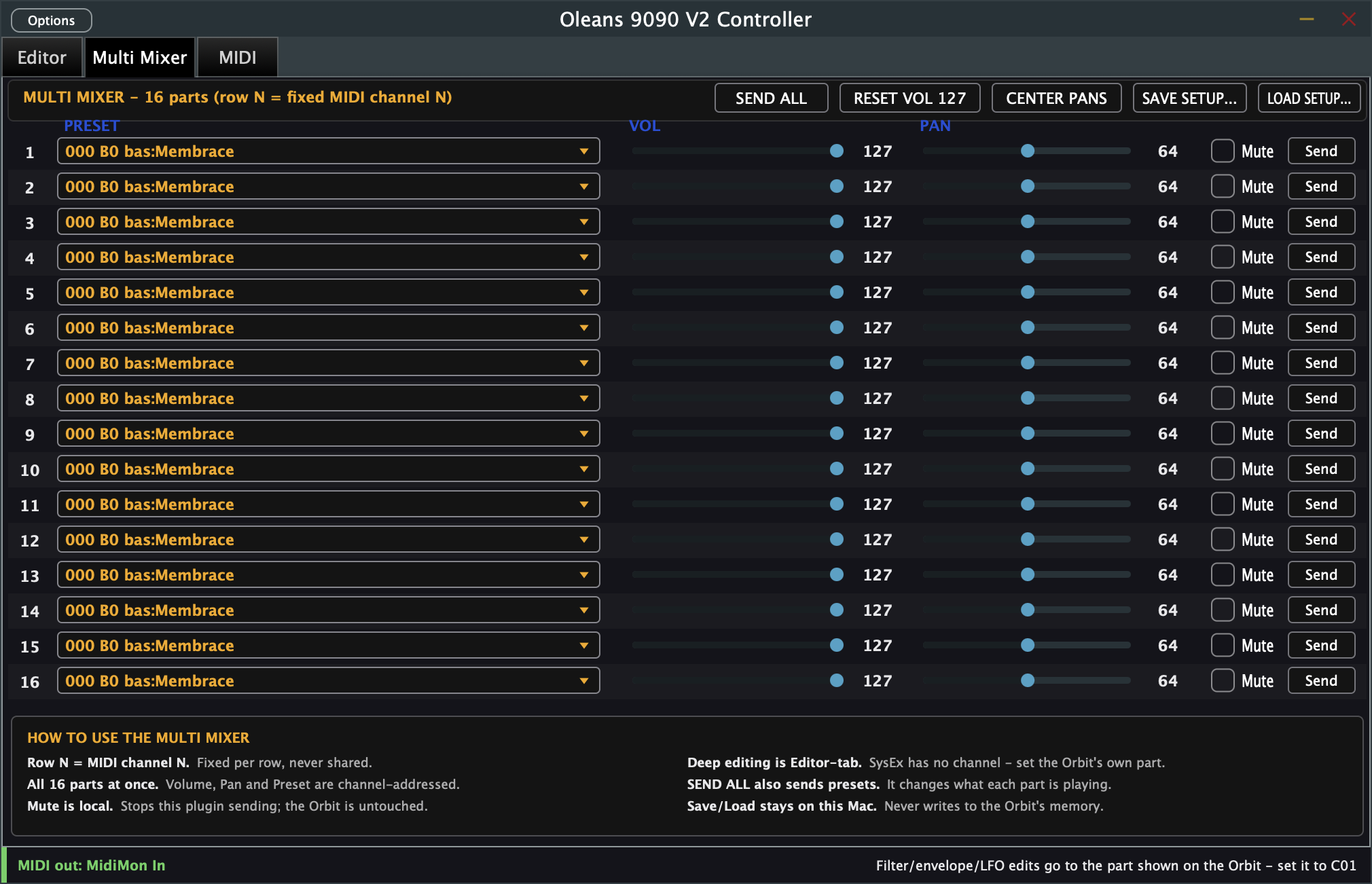
All sixteen parts reachable from one window. The Multi Mixer tab shows preset, volume, pan, mute and send for every one of the sixteen parts at the same time. Building or adjusting a full multitimbral set — the kind of setup that would normally mean paging through the Orbit’s display sixteen separate times — becomes a single screen you can see and edit at a glance.
Presets you can actually find. All 640 factory presets, grouped automatically into sixteen categories (Bass, Synth, Pad, Lead, Drums, Beats, and more) instead of one long undifferentiated list. Favourite the ones you use, and load any preset onto any of the sixteen parts directly from the browser.
It also plugs into your workflow rather than sitting outside it: every control is a normal DAW parameter, so it’s automatable and recalled with your project exactly like any other plugin. But only the four Performance controls, volume and pan work with MIDI CC and will react in a steady and clean way to automation. Most other parameters work with MIDI SysEx and update in small chunks. So automation works, but won’t have the exact same result as you might expect. Also REALLY important: The controller sends MIDI to your Orbit and nothing else — it doesn’t generate sound itself and it never writes to the Orbit’s own memory, so nothing you do in the plugin can overwrite a preset you care about.
The result is the difference between “technically possible” and “actually usable”: the Orbit’s sound design was always this deep, but reaching it a part at a time through a two-line screen made that depth mostly theoretical for anything beyond a single patch. One screen, sixteen parts, all 640 presets organized and searchable — that’s the practical difference this controller makes.
What ended up in the plugin
The result is a single window with four tabs, each built around the channel-vs-SysEx split described above.
Editor — one part at a time: preset by name, both filters (18 types, cutoff, resonance), both envelopes with full AHDSR and their on/off switches, the auxiliary envelope, two LFOs, and the four Performance macros. PREV/NEXT step through all 640 presets; SYNC re-sends the plugin’s current state to the hardware after you’ve changed something on the Orbit itself.
Multi Mixer — all sixteen parts on one screen: preset, volume, pan, mute and send, per row, all channel-addressed so this page works regardless of what the Orbit’s own display is showing. A “Send All” button re-transmits every row at once, paced so it doesn’t flood the Orbit’s MIDI input.
Presets — the newest tab: all 640 factory presets grouped into the sixteen categories their own naming convention implies, shown four across so most of them fit on screen without scrolling, a star to favourite the ones you actually use (saved once, outside any project, so favourites survive across every session and every DAW you open the plugin in), and a “Send To — Ch N” selector so clicking a preset in the browser is functionally identical to picking it from that same channel’s row in Multi Mixer — both read and write the exact same underlying parameter, on purpose, so the two tabs can never disagree with each other.
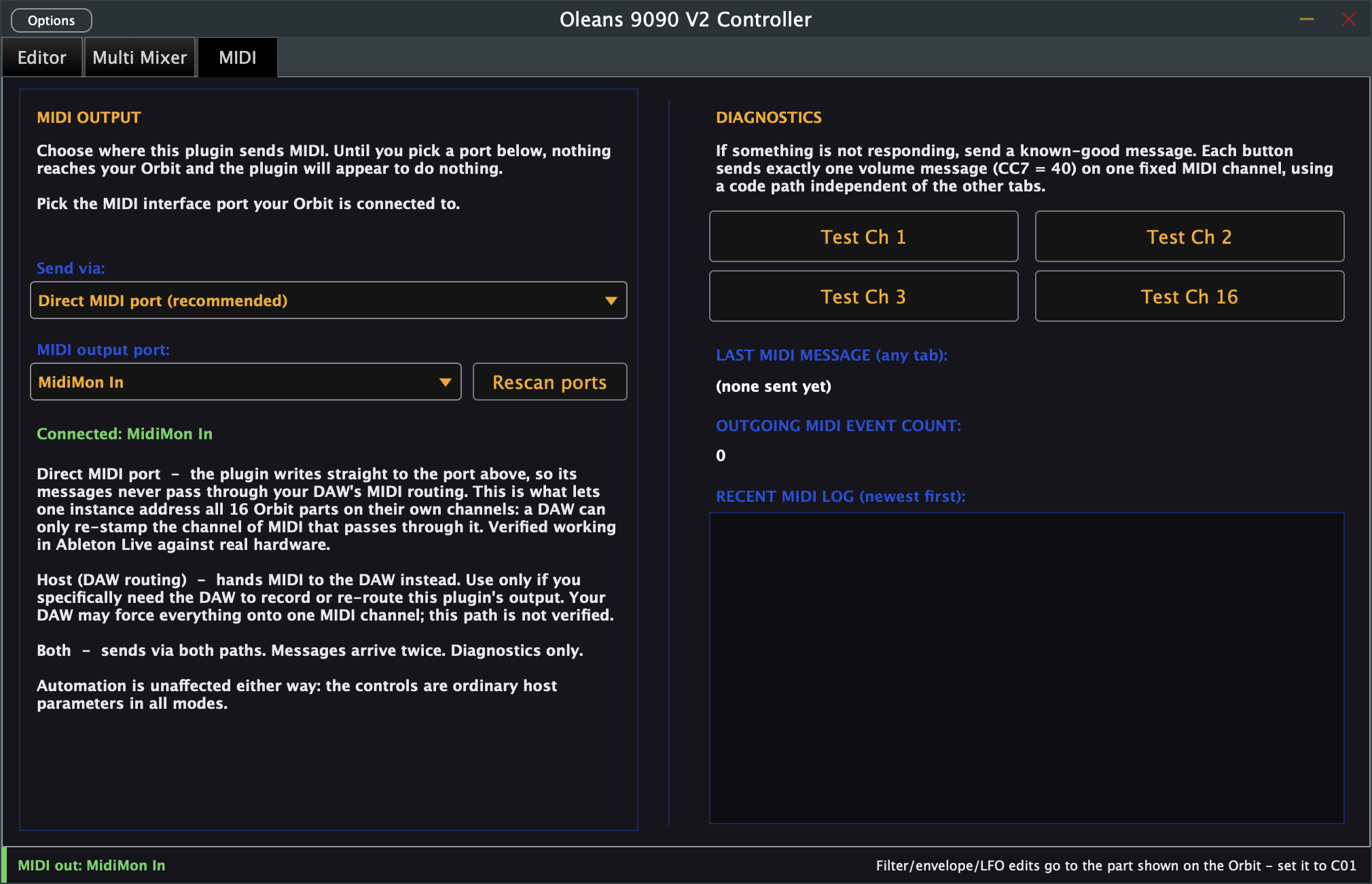
MIDI — port selection, the direct-vs-host routing choice explained above, and diagnostics: a decoded log of the last forty messages sent, a running count, and four one-button tests that each send a single, isolated volume change on a fixed channel, specifically so a “why isn’t this working” report can be narrowed to cable, port, Device ID or plugin in under a minute.
Multi Mixer — all sixteen parts, one screen, channel-addressed so it always reaches every part.
One design rule holds across every tab, and it’s tested on every build rather than just documented: the plugin never writes to the Orbit’s own memory. There is no save-to-hardware command anywhere in it. Everything it sends affects the currently loaded preset’s edit buffer, and reloading that preset from the Orbit’s own front panel undoes anything the plugin did. You can experiment freely without a way to accidentally overwrite a factory or user preset you care about.
The MIDI tab — port selection, routing mode, and a live diagnostics log.
Tested on my hardware
Every core function — filter sweeps, envelope behaviour, preset recall, the full sixteen-part mixer, and now the presets browser — has been checked against a real Orbit 9090/V2, watching the hardware respond, not just trusting the byte math against the SysEx spec. Confirmed in Ableton Live and in GarageBand, which matters because GarageBand can only host AU at all and forced a genuinely separate code path to prove itself on a second host, not just a second format. The Max for Live device has had its own separate hardware pass, all sixteen parts responding independently from a single instance.
None of this makes the plugin infallible — the SysEx channel limitation described above is permanent and applies no matter who writes the editor. But it does mean that when this controller claims a feature works, that claim was checked by plugging the actual hardware in and watching it happen, not by reading the protocol document and assuming.
Get it
The 9090/V2 Controller ships as a VST3/AU/Standalone plugin for macOS, and a Max for Live device for Ableton Live on macOS or Windows — both included with one purchase, signed and notarized, ready to install.
See the full feature list and get the 9090/V2 Controller →
To provide the best experiences, we use technologies like cookies to store and/or access device information. Consenting to these technologies will allow us to process data such as browsing behavior or unique IDs on this site. Not consenting or withdrawing consent, may adversely affect certain features and functions.
Functional
Always active
The technical storage or access is strictly necessary for the legitimate purpose of enabling the use of a specific service explicitly requested by the subscriber or user, or for the sole purpose of carrying out the transmission of a communication over an electronic communications network.
Preferences
The technical storage or access is necessary for the legitimate purpose of storing preferences that are not requested by the subscriber or user.
Statistics
The technical storage or access that is used exclusively for statistical purposes.The technical storage or access that is used exclusively for anonymous statistical purposes. Without a subpoena, voluntary compliance on the part of your Internet Service Provider, or additional records from a third party, information stored or retrieved for this purpose alone cannot usually be used to identify you.
Marketing
The technical storage or access is required to create user profiles to send advertising, or to track the user on a website or across several websites for similar marketing purposes.




 I’ve had the E-MU Orbit 9090 also known as ‘The Dance Planet’ in my Rack for quite some time, but unfortunately never ended up using it enough. If you own one too, you already know the ridiculous amount of patience you need to edit and browse its sounds: a two-line LCD, one data-entry knob, and sixteen multitimbral parts all hidden behind the same menu. The Z-plane synthesis it is famous for is genuinely excellent — smooth, resonant, morphing filters that have a sound I still love to include in my productions. The front panel is the opposite of excellent. Editing one filter means paging through a screen the size of a stamp. Editing sixteen means doing that sixteen times, from memory, because the display can’t show you where you were.