



Korg Electribe ESX Editor
Coming soon · €24.00 launch price
A macOS sample-and-set editor for the Korg Electribe ESX-1. Prepare samples, inspect .esx files, organise mono slots, assign sounds to pattern parts and build sample chains before transferring a set to the instrument.
Expected release: early November 2026.
24,00 € incl. VAT

Prepare ESX sets from a larger workspace
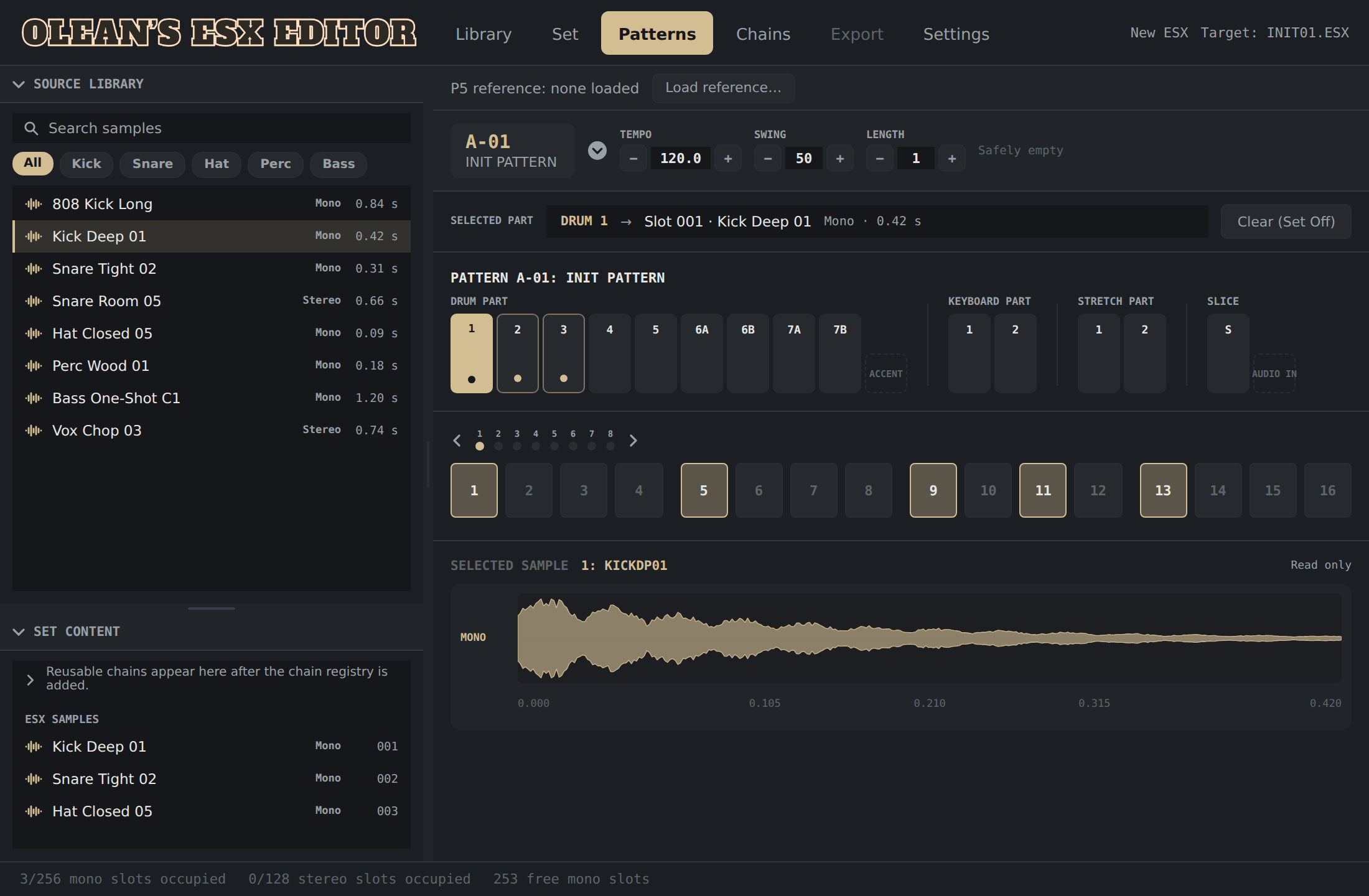
Building an Electribe set means choosing samples, preparing their audio, fitting them into slots and keeping track of the patterns that use them. Olean’s ESX Editor brings those jobs into a Mac application with a source library, waveform views, a set-slot list and a pattern-part view.
The workflow uses the instrument’s .esx Save-All files. Work on the computer, export a set and transfer it through the ESX’s compatible storage media. It is a file-preparation workflow, rather than live MIDI remote control.
Inside the current app
- Source library: browse and search local samples, view waveforms and prepare channel selection, trim, fades, optional normalisation and resampling.
- Set inspection: view existing mono/stereo sample slots and pattern-part references in an .esx document.
- Mono-slot editing: insert new mono samples into free slots and replace an occupied mono slot through a confirmation showing affected pattern references.
- Pattern sample assignment: use an existing sample or prepare a source sample for a melodic/drum part through the implemented mono workflow.
- Sample chains: start-point and slice-chain preparation, with documented real ESX-1 checks of the relevant playback/selection paths.
- Set planning: one-shot/kit preparation, slot allocation and export workflows for building an ESX file from selected sources.
Hardware, format and requirements
The documented hardware tests use a Korg Electribe ESX-1. ESX-1SD support has not been confirmed separately.
This is a macOS Standalone application, with macOS 13 or later configured as the minimum. A DAW is not required. No VST3, Audio Unit, Max for Live or Windows desktop release is confirmed.
You need suitable source audio or an .esx Save-All file, plus compatible instrument storage media and a reader for transferring exported files. Keep a backup of your own ESX sets before replacing sample content.
What it is and isn’t
This app prepares sample/set data for the hardware. It does not emulate the Electribe’s sound engine, process the live hardware audio or control it in realtime through MIDI.
Existing stereo slots are visible, but stereo-slot writing and stereo part assignment are not enabled in the current app. The step grid has a local preview; exporting changed trigger sequences remains gated by hardware validation. The preview must not be mistaken for a finished pattern sequencer.
Electribe ESX editor FAQ
Do I need Ableton Live?
No. The implemented product is a standalone Mac app that prepares .esx files outside a DAW.
Can I replace a sample used by several patterns?
The mono replacement workflow shows the references to the chosen slot and asks for confirmation. Every pattern still referring to that slot will use the new audio.
Can I export edited step sequences?
Not in the current app. Step-grid interaction is a local preview while trigger export remains gated.
Is a Windows or ESX-1SD version confirmed?
No. The documented desktop app is macOS, and the recorded hardware checks use ESX-1. Other release targets need separate verification.
Support and independent development
Questions about your ESX workflow? Contact info@oleanshouse.com. Visit the Olean’s House synth editors hub for available tools.
Independent software by Olean’s House for Korg Electribe ESX-1 hardware. Not affiliated with, endorsed by or officially supported by KORG. Korg, Electribe and ESX names are used descriptively to identify the intended instrument.